🔒 Introducing Verified Author Revenue
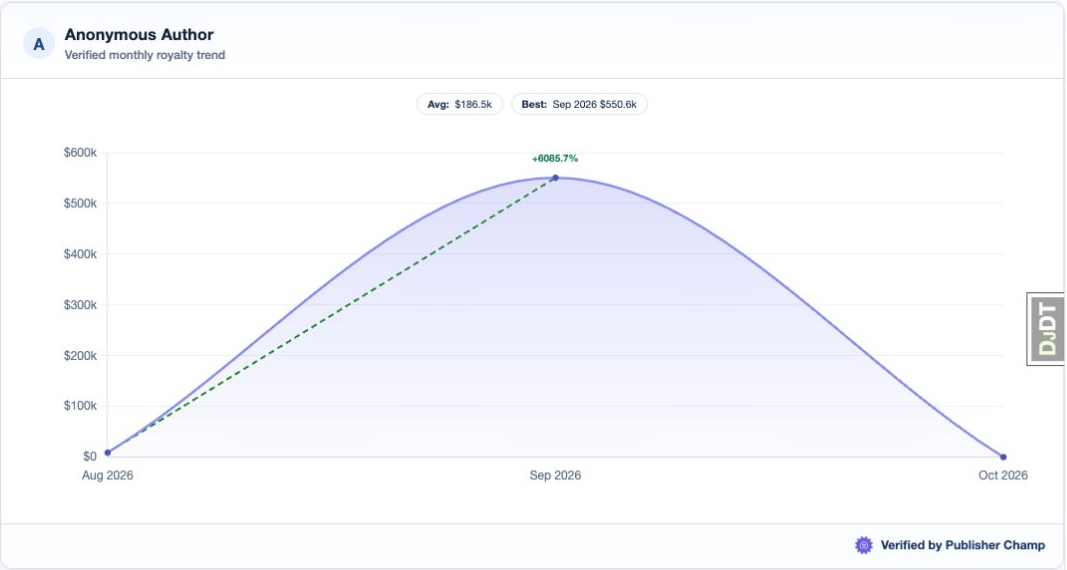
Turn your real revenue data into trust you can share. Verified Author Revenue gives you a public, verifiable page backed by Publisher Champ, so readers, subscribers, and partners can trust the performance you share.
🚀 Best Use Cases for Verified Author Revenue
📱 Social Media Credibility
- Share in Facebook groups to support your income claims with proof
- Post on Instagram/X to show authentic growth
- Add to your social profiles to strengthen trust instantly
🌐 Website Integration
- Add to your homepage to build visitor confidence
- Use on About pages to show your business trajectory
- Include on sales pages as high-converting social proof
🎥 YouTube Verification
- Link in video descriptions to verify earnings you mention
- Use the verified badge to reduce skepticism
- Strengthen income-focused content with transparent proof
📧 Marketing Materials
- Include in newsletters to show progress over time
- Use in blog posts when discussing strategy and outcomes
- Add to course materials as verified proof points
💼 Professional Use
- Share with partners to demonstrate consistency
- Include in presentations for reliable proof
- Add to proposals to back up your positioning with data
⚙️ How to Set Up Verified Author Revenue
Step 1: Access Your Settings
Navigate to Verified Author Revenue.

Step 2: Enable and Configure Visibility
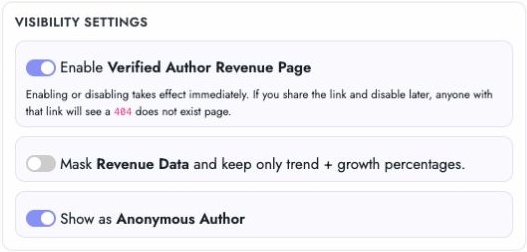
Turn on Enable Verified Author Revenue Page, then choose your sharing mode. Enabling or disabling takes effect immediately; disabling makes the shared page return a 404.
- Mask Revenue Data to hide exact values and show only trend/growth
- Show as Anonymous Author to hide your display name
Step 3: Copy Your Public URL
Copy your Public URL to share a link, or copy the Website embed HTML to embed the page on your website. The screenshot hides the example URL and embed contents.

Step 4: Save and Publish
Click Save share settings to apply your masking, anonymous mode and display name settings publicly. The live preview reflects these choices immediately, before saving. The preview shows the last three months; the public page shows up to twelve months.
🌟 Why This Works
Verified Author Revenue helps you earn trust faster by reducing uncertainty.
Course Makers: Back up income claims with verifiable results.
Creators & Influencers: Show transparent growth and separate yourself from unverified claims.
Business Owners: Give partners, clients, and investors confidence with real metrics.
🛡️ Data Integrity
Your page reflects data sourced from your connected revenue streams. When you display Verified by Publisher Champ, you’re giving your audience transparent, credible proof.
Ready to increase trust with proof? Enable Verified Author Revenue and share your growth with confidence.
Real results. Verified trust.